TL;DR
- Tamil voice typing is free on every platform: Gboard on Android, Google Docs in Chrome on desktop, and Windows key plus H on Windows 11.
- Apple Dictation does not support Tamil at all, so iPhone users go through Gboard instead.
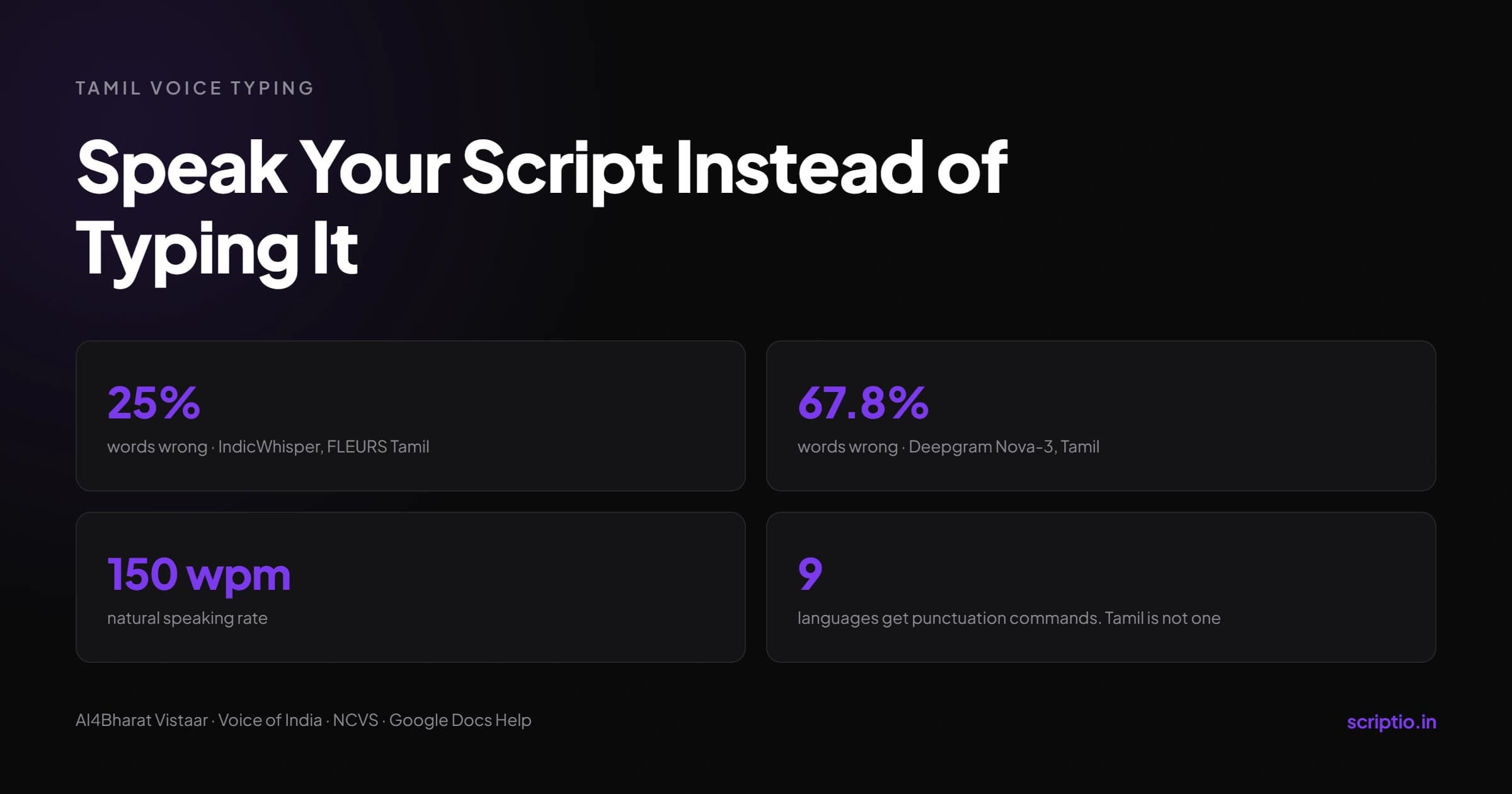
- No vendor publishes a Tamil-only accuracy figure. The cleanest independent benchmark puts the best model at about 25% word error rate, meaning roughly one word in four comes back wrong.
- Tanglish does not work. The engine listens in one language at a time, so English words spoken inside a Tamil sentence get written in Tamil letters and distorted.
- Tamil has no spoken punctuation commands. Google supports them in nine languages and Tamil is not one of them, so punctuation is a cleanup pass.
- Raw dictation is captured thought, not a draft. Speak in one continuous take, fix nothing while speaking, then structure it afterward.
You sit down to script a ten minute video. You type one Tanglish line.
You stop, switch keyboards, hunt for a character, switch back. Forty minutes later you have an intro you do not even like.
You were never slow at thinking. You were slow at typing.
Tamil voice typing lets you speak into your phone or laptop and get Tamil script on screen, with no keyboard layout to memorise. In 2026 it works on Android through Gboard, on desktop through Google Docs, and system-wide on Windows 11 using Windows key plus H. On iPhone, Apple Dictation does not support Tamil, so Gboard fills the gap.
Setup is the easy half. The half nobody warns Tamil creators about is what arrives afterward: no punctuation, no Tanglish handling, and a transcript that reads like one long breath. This guide covers both.
What Is Tamil Voice Typing?
Tamil voice typing is speech recognition that turns spoken Tamil into Tamil script inside any text field, without a keyboard layout.
The engine listens to your audio, matches it against a Tamil acoustic model, and writes the output as Tamil Unicode. Same technology behind Google Search voice queries, pointed at a text box instead of a search bar.
For a creator, the appeal is simple. Typing Tamil script is mechanically slow because the language carries hundreds of composite glyphs, and every one of them costs you keystrokes. Speaking costs you nothing beyond the thought itself.
Picture the difference on a hook. You open Gboard, hold the mic, and say your opening line the way you would say it on camera. Eight seconds. Typing that same line in Tamil script takes most creators well over a minute.
How Do I Set Up Tamil Voice Typing?
Add Tamil as an input language, then tap the microphone icon. Every platform follows that same two-step pattern.
Android and Gboard
- Install Gboard from the Play Store and set it as your default keyboard under Settings, System, Languages and input.
- Open Gboard settings, go to Languages, tap Add keyboard, and select Tamil (India). Variants for Sri Lanka and Singapore also exist.
- Under Voice typing, download the offline Tamil speech pack, roughly 45 MB. Voice input then survives a weak signal.
- Open any app, tap a text field, long-press the space bar to switch to Tamil, then tap the microphone.
Failure mode: if the mic cuts out instantly or you keep seeing "Sorry, I did not catch that," the offline pack is missing or your Speech Recognition and Synthesis engine is stale. Update it from the Play Store first.
iPhone and iPad
Apple Dictation does not support Tamil. Gboard is the workaround, and it runs Google's engine inside iOS.
- Install Gboard from the App Store.
- Go to Settings, General, Keyboard, Keyboards, Add New Keyboard, and pick Gboard.
- Tap Gboard and turn on Allow Full Access.
- Open the Gboard app and add Tamil as a language.
- In any app, long-press the globe icon, choose Gboard, then tap the microphone.
Failure mode: Gboard Tamil dictation on iPhone has a long history of the mic dropping mid-sentence. Use it for captions. For a full script, move to desktop.
Google Docs on desktop
- Open a document in Chrome. Voice typing does not run in other browsers reliably.
- Go to Tools, then Voice typing. Ctrl plus Shift plus S does the same thing.
- Click the language dropdown above the mic icon and select Tamil.
- Click the mic. When it turns red, speak at a natural pace.
This is the most stable option for long-form drafting, and it is free.
Windows 11
- Open Settings, Time and language, Language and region, then Add a language.
- Search for Tamil (India), select it, and install.
- Press Windows key plus Spacebar until Tamil is the active input.
- Put your cursor in any text box and press Windows key plus H.
- Speak after the Listening prompt. Say "stop listening" or press the mic button to end.
Which Tamil Voice Typing Tool Is Best for Creators?
Gboard for quick captures on the phone, Google Docs for long-form drafting, Sarvam for recorded audio that is heavy on Tanglish.
| Tool | Best for | Price | Works offline | Tanglish handling | Published Tamil accuracy |
|---|---|---|---|---|---|
| Gboard (Android, iOS) | Captions, short notes, comments | Free | Yes, after the 45 MB pack | Weak. Listens in one language at a time | None published |
| Google Docs voice typing | Long-form script drafting | Free | No. Chrome and internet required | Weak | None published |
| Windows 11 (Win + H) | System-wide dictation on PC | Included with Windows | No | Struggles on English to Tamil switches | None published |
| Sarvam (Saaras) | Recorded audio, code-mixed speech | Rs.30 per hour (as of July 2026), Rs.100 free credits | No. API and dashboard | Strongest. Trained on code-mixed Indian speech | 19.31% WER across 10 languages, not Tamil-only. Source: Sarvam AI speech-to-text docs |
| ElevenLabs Scribe | Subtitles, timestamps, diarization | Roughly $0.22 to $0.40 per hour | No | Moderate | Scribe v1 at 5.9% on FLEURS Tamil, per its own Tamil page |
| Whisper (vanilla) | Not recommended for Tamil untuned | Free, self-hosted | Yes | Weak | 26.0% on FLEURS Tamil, per ElevenLabs' Tamil page |
| Deepgram Nova-3 | Not recommended for Tamil | Paid API | No | Weak | 67.8% WER on the Voice of India benchmark |
Who picks which: if you are capturing a hook idea while walking, Gboard wins on friction alone. If you are drafting a full script at a desk, Google Docs wins on stability. If your speech is dense Tanglish and the script matters, record clean audio and run it through Sarvam. The same logic that separates general-purpose AI from Tamil-tuned AI in Scriptio vs ChatGPT applies to speech engines.
The Tamil Accuracy Numbers Nobody Publishes
No company publishes a Tamil-specific accuracy figure for its voice typing. The only clean comparisons come from academic benchmarks.
Word error rate, or WER, counts how many words out of a hundred come back wrong. Lower is better. Here is what the record actually shows.
| Metric | Figure | Source |
|---|---|---|
| IndicWhisper, FLEURS Tamil | About 25% WER | AI4Bharat Vistaar benchmark, Interspeech 2023 |
| Google STT v1, FLEURS Tamil | About 37% WER | Vistaar benchmark |
| Whisper large-v3, FLEURS Tamil | 26.0% WER | ElevenLabs Tamil speech-to-text page |
| Deepgram Nova-3, Tamil | 67.8% WER | Voice of India benchmark, 2026 |
| Sarvam, 10 Indian languages combined | 19.31% WER | Sarvam AI speech-to-text documentation. Aggregate, not Tamil-only |
| Tamil keyboard typing standard | 25 to 30 words per minute | TNPSC Tamil typing requirement |
| Natural speaking rate | Around 150 words per minute | National Center for Voice and Speech |
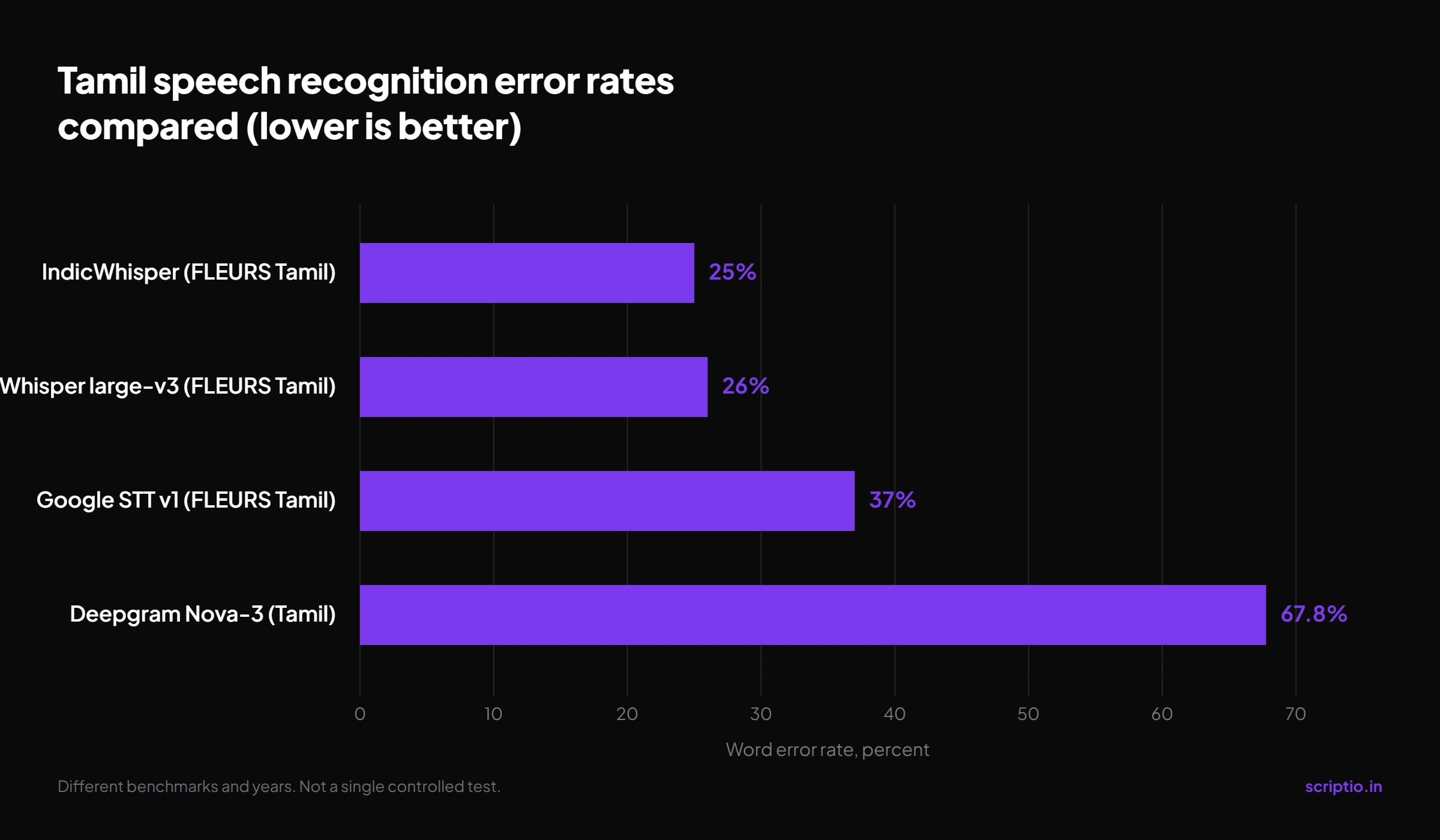
Read that first row again. Roughly one word in four came back wrong, from the model that won its category. On a 2,000 word script, that is a serious correction pass, and it is why creators who dictate straight into a caption box give up by week two.
Treat the marketing figures with suspicion. ElevenLabs advertises 3.1 percent on its Tamil page, and the identical string sits on its English, Thai, and Japanese pages, which makes it a template rather than a Tamil measurement. Its own language tier list places Tamil in the above-5-percent bucket. Browser tool pages claiming 99 percent accuracy publish no methodology at all.
Does Gboard Handle Tanglish When You Voice Type?
No. Google's voice typing listens in one language at a time, so a Tanglish sentence gets forced into a single script.
When the engine is locked to Tamil and you say an English word, it has to write that word in Tamil letters. Sometimes it lands. Often it does not: "channel" comes back closer to "senal", "algorithm" splits into two separate words, "content" arrives as something you would not recognise reading aloud.
This is not a small edge case for Tamil YouTube. Our study of Tanglish ratio across niches found the mix running from 54 percent Tamil in finance to 94 percent Tamil in devotional. A finance creator dictating in Tamil-only mode is fighting the engine on close to half their words.
One clarification worth making: Gboard's transliteration mode, where you type Roman letters and get Tamil script, is a typing feature. It does not apply to voice input at all.
Purpose-built Indian ASR survives this better. Sarvam trains explicitly on code-mixed speech and ships a dedicated code-mix output mode. Be aware that no rigorous published Tanglish word error rate exists anywhere, so every claim about "best Tanglish handling," including that one, is directional rather than measured.
Why Does Tamil Voice Typing Skip Punctuation?
Google supports spoken punctuation commands in nine languages, and Tamil is not among them.
Per Google's own documentation, the supported list runs English, Spanish, French, German, Italian, Portuguese, Russian, Turkish, and Hindi. In every other language, voice typing writes your words and leaves punctuation to you.
The mechanism is blunt. Say "comma" while dictating in Tamil and the engine hears a word, so it writes that word. Say the Tamil term for full stop and you get the term spelled out, sitting in the middle of your sentence.
Stop fighting it. Pause for a second or two at the end of each thought and add punctuation in the cleanup pass, where it costs you thirty seconds instead of breaking your flow forty times.
"My Raw Dictation Comes Out as a Mess"
Fair. It does, and that is the correct output.
Raw dictation is not a draft. It is captured thought, closer to raw clay than to a finished shape. Judging it as a script is the mistake that sends creators back to typing.
Here is the workflow that works:
- Speak in one continuous take. Ignore every typo and every missing full stop. Correcting while speaking is what triggers mic timeouts and kills your momentum.
- Pause, do not narrate punctuation. One to two seconds at each thought boundary gives you natural break points to work from later.
- Run one batch find-and-replace. If the engine mangles the same term every time, fix all instances at the end rather than one by one.
- Structure it into a script. Hook, body, close. Check the length against a script word counter before you record, because dictation runs long.
Step four is where most creators stall, because it is a different skill from talking. If you want the shape to work from, the Tamil YouTube script template gives you the skeleton to pour the transcript into.
The alternative is to skip the manual structuring entirely. Voice DNA (Scriptio's analysis engine) reads your past videos and extracts your pacing, hook style, Tanglish ratio, and regional dialect, then writes the script in that voice. You can read how Voice DNA works if you want the mechanics.
Speak the Idea. Let Scriptio Build the Script.
Voice typing solved your input problem. It captures the idea at the speed you think, in the language you actually speak, for free, on the phone in your hand.
It does not solve the output problem. A transcript is not a script, and no dictation engine on earth knows where your hook ends or how much English your audience expects from you.
That gap is exactly what Scriptio was built to close. Speak your idea messy. Get back a camera-ready Tanglish script in your own voice, in about 60 seconds.
Next step
You already said it out loud. Let Scriptio shape it.
Voice DNA reads your existing uploads and writes new scripts in your exact Tanglish ratio and dialect, so the finished script sounds like the version you dictated on your best day.
5 free credits every month. No card required.
Frequently Asked Questions
Is Tamil voice typing free?
Yes. Gboard on Android and iPhone, Google Docs voice typing on desktop, and Windows 11 voice typing are all free with no usage cap. Paid options like Sarvam at Rs.30 per hour (as of July 2026) or ElevenLabs Scribe only make sense when you are transcribing recorded audio at higher accuracy.
Does Tamil voice typing work offline?
On Gboard, yes, once you download the Tamil offline speech pack of roughly 45 MB from the voice typing settings. Google Docs and browser-based mic tools are online-only, whatever their landing pages claim. Offline recognition is generally less accurate than the cloud model but survives a bad connection.
How do I use Tamil voice typing on iPhone?
Apple Dictation does not support Tamil. Install Gboard from the App Store, add it under Settings, General, Keyboard, Keyboards, then enable Allow Full Access and add Tamil as a language. Long-press the globe icon in any app, switch to Gboard, and tap the microphone.
Which is the most accurate Tamil speech to text tool?
For recorded audio, Sarvam and ElevenLabs Scribe lead. Be careful with the numbers: no vendor publishes a Tamil-only word error rate. The cleanest independent benchmark is AI4Bharat's Vistaar, where IndicWhisper hit about 25 percent WER on FLEURS Tamil, ahead of Google and Azure.
Why does my Tamil voice typing keep saying "Sorry, I did not catch that"?
Two usual causes. The Tamil offline speech pack never finished downloading, or your Speech Recognition and Synthesis app is out of date. Update it from the Play Store, re-download the pack in Gboard voice typing settings, then confirm microphone permission is granted for the app you are typing in.
Can I voice type Tanglish directly?
Not cleanly. Google's voice typing listens in one language at a time, so English words spoken inside a Tamil sentence get written in Tamil letters and often distorted. Purpose-built Indian ASR like Sarvam handles code-mixed speech better, though no published Tanglish accuracy benchmark exists to verify it.
How do I convert voice to Tamil text on a laptop?
Open a Google Doc in Chrome, go to Tools then Voice typing, select Tamil from the language dropdown above the mic, and click the microphone. On Windows 11, install Tamil (India) under Language and region, switch input with Windows key plus Spacebar, then press Windows key plus H.
Write your next script in 60 seconds.
Scriptio writes a full Tanglish script in your exact voice, built from your own channel.
Explore the Tamil AI script writer or the Tanglish script generator for a more detailed walkthrough.
Start Free at Scriptio.in