Quick Summary
- Give a Short one recognizable subject, answer or moment.
- Write enough title context for search and channel browsing, while making the opening understandable in the feed.
- YouTube allows a Shorts title of up to 100 characters; a shorter editorial target is not a platform rule.
- Use relevant hashtags where they fit; do not replace the actual promise with a tag list.
- Review discovery source and viewing behavior, and avoid claiming a clean title test from two different uploads.
Write a YouTube Shorts title that names one specific subject and the moment, answer or result the video delivers. Keep the essential context early, remove filler and check that the opening shows the same promise. YouTube allows up to 100 characters, but the useful length depends on what a stranger needs to understand this particular Short.
“Watch This!” is short but vague. “Phone Mic Placement: Collar vs Desk” is longer and identifies a concrete comparison. Neither wording can fix a video that starts without showing the subject. This guide separates feed discovery from search, then gives Tamil and Tanglish examples you can adapt. Every example is illustrative, not a tested viral title.
Do titles matter in the Shorts feed and search?
Yes, titles matter, but their role changes with the discovery surface: in search, they help viewers identify an answer or topic; in the Shorts feed, the opening must communicate the premise while the video may already be playing. YouTube's Shorts discovery guidance describes search metadata matching and recommendation signals based on viewer response and personalization.
| Discovery situation | What your title should clarify | What the video must do |
|---|---|---|
| YouTube Search | The task, object or question | Answer the identified query |
| Shorts feed | The specific moment or premise | Make the subject understandable immediately |
| Channel page | Why this Short differs from nearby uploads | Deliver the distinct moment promised |
| Home or subscription browsing | A recognizable reason to choose it | Match the expectation created by the package |
A clear title can serve several surfaces when it preserves the same audience and promise. The YouTube title strategy framework helps you identify those foundations; for Shorts, carry them into the first visible or spoken moment so viewers can understand the video without opening its description.
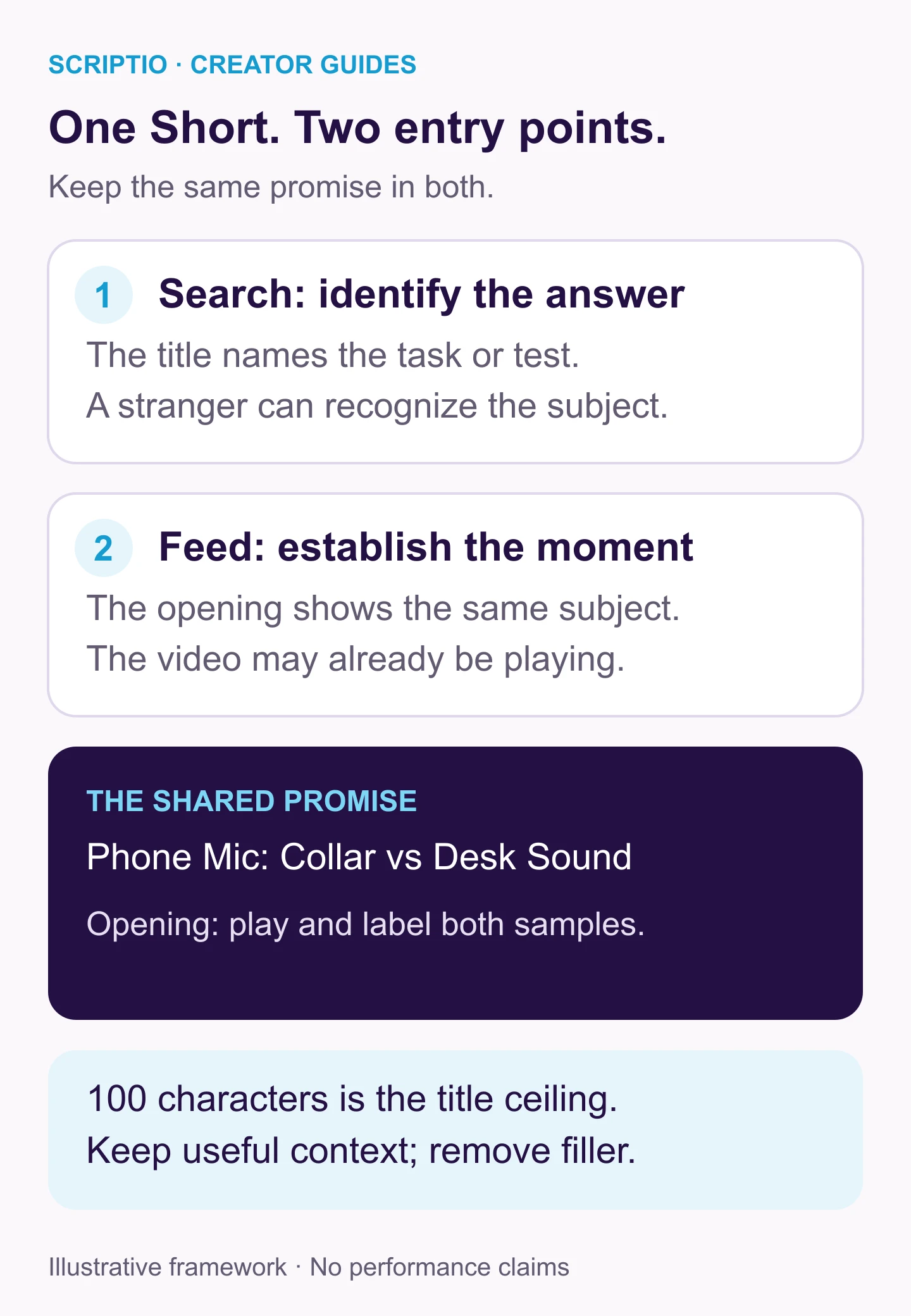
The discovery surface changes the title’s role, but the subject stays consistent. Write enough context for someone choosing from search results and make the opening equally understandable to someone encountering the Short in the feed.
YouTube Shorts title length: what is the character limit?
The maximum is 100 characters, according to YouTube's Shorts creation guide. Treat that as a ceiling rather than an ideal length: keep the subject and essential distinction, then remove words that add no meaning. A shorter drafting target can help you edit, but it does not establish a universal ranking or distribution rule.
Preview the title rather than counting alone. Different wording, scripts, screens and interfaces affect how much text a viewer can see. Put the subject and essential distinction before filler.
- Too little context: “One Setting.”
- More useful context: “Phone Video Too Dark? Check Exposure Lock.”
- Too much filler: “Hello Friends, Today I Am Going to Show You One Very Useful Phone Camera Setting.”
The useful version names the problem and the feature. Keep it only if the Short accurately demonstrates that feature in the relevant app.
YouTube Shorts title strategy: a three-part method
1. Name the smallest complete promise
Limit the promise to the one answer or moment the Short actually shows. For a microphone demonstration, write: “This Short compares the sound when the same mic is clipped to a collar and placed on a desk.” That gives the title a concrete comparison to name without claiming to solve every audio problem.
2. Write a short video title with enough context
Name the object, task or situation. Include a relevant app or version if it changes the steps. Use “Tamil” where language context helps the intended viewer. Remove “must watch,” “viral video” and channel greetings if they add nothing to the promise.
3. Make the opening confirm it
Show the microphone or play the two recordings. Do not assume the title will carry all the explanation while the opening shows something unrelated. A concise on-screen label can establish the comparison, but it should remain readable and avoid hiding the demonstration.
Worked examples: when brevity helps
| Vague or overloaded draft | More specific direction | Opening that supports it |
|---|---|---|
| Amazing Cooking Hack! | Dosa Sticking? Check Pan Heat | Show the sticking problem and the heat check |
| My New Tech Short Today | Phone Mic: Collar vs Desk Sound | Play the two sample recordings |
| Best Physics Explanation Ever | Series vs Parallel: One Bulb Removed | Show the two circuits and the removed bulb |
| You Will Not Believe This Place | The Turn We Missed on Our Hill Walk | Establish the route and missed turn |
| Editing Tips Part 14 | Trim a Phone Clip Without Losing the Original | Show the duplicate or non-destructive workflow |
These are directions to adapt to the finished video. A cooking Short should not imply pan heat is the only cause of sticking. A software Short should verify the behavior of the actual app. The strongest edit removes filler while preserving the difference that makes the Short useful.
Worked examples: when extra context is worth keeping
Keep extra words when they identify what was compared, taught or demonstrated. “Mic Test” leaves the comparison unclear, while “Phone Mic: Collar vs Desk Sound” names both placements. Likewise, “Trim a Phone Clip Without Losing the Original” explains a task that “Editing Trick” does not.
For an education Short, “Series vs Parallel: One Bulb Removed” identifies the concept and the experiment more clearly than “Circuit Explained.” The YouTube title formulas help you build a specific task, comparison or story angle; narrow that structure to the one moment your Short delivers before shortening around the meaning.
Tamil and Tanglish title options
Choose familiar wording that preserves the object and the comparison, rather than forcing every language into the same length. For a Short demonstrating microphone placement, the options below communicate the same test in English, Tanglish and Tamil script, with different phrasing needs.
- English with language context: “Phone Mic: Collar vs Desk Sound | Tamil.”
- Tanglish: “Mic Collar-la Vecha vs Desk-la Vecha: Sound Test.”
- Tamil script: “மைக்கை காலரில் வைத்தால்? மேசையில் வைத்தால்? ஒலி சோதனை.”
The Tanglish version means “Mic placed on the collar versus on the desk: sound test.” Use terms your audience recognizes and adapt informal spelling to your voice. Keep one readable version in the title and preserve its meaning even when a Tamil-script phrase needs more room. If this is your first Short, the first-video title worksheet helps you identify the viewer and the context they need before you choose the language. Use that decision to guide wording instead of combining every translation into one title.
Should hashtags go in the title or description?
YouTube permits hashtags in both fields. Use relevant hashtags; a title consisting mainly of tags communicates little about the actual Short. A practical editorial option is to keep the title focused on the promise and put optional tags in the description. That is a readability choice, not a proven ranking advantage.
- Title: “Phone Mic: Collar vs Desk Sound.”
- Description: “The same microphone recorded in two positions in the same room. Listen to the samples before choosing your setup.”
- Optional relevant hashtags: “#AudioTest #TamilCreators.”
Avoid unrelated trends or claims that a fixed hashtag bundle makes a Short viral. Also avoid treating #Shorts as a substitute for meeting YouTube's current format requirements.
Shorts title best practices: title, opening text and description
The title identifies the promise. Opening text can establish context while the Short plays. The description can clarify conditions or point to useful supporting material. Give each field a specific role instead of expecting the viewer to read everything before understanding the video. For this microphone comparison, the title names the test, the opening labels its samples and the description supplies the conditions needed to interpret them:
- Title: Identifies the two placements.
- Opening text: Labels the sample currently playing.
- Description: Explains that the device, room and recording settings were kept the same, if that is true.
Keep these fields consistent: a small description note cannot make an unsupported “perfect audio” title accurate. If you expand the comparison into a long-form upload, the title and thumbnail strategy guide helps you show the test conditions in the image while the title names the decision or question the video addresses.
How should you review Shorts performance?
Look at how viewers found the Short before choosing what to change. A feed-heavy upload and a search-heavy upload answer different questions about the title. YouTube changed Shorts view counting in March 2025 and retained engaged views for comparing continued viewing. Do not treat all starts or replays as evidence that a title persuaded someone to click.
| Question | Useful evidence | Limit |
|---|---|---|
| Does search wording match the topic? | Search terms and search traffic, where available | Small samples may not support a conclusion |
| Does the opening establish the promise? | Continued viewing and retention patterns | The title is only one part of the experience |
| Does one angle seem useful across uploads? | Similar topics and formats over time | Different videos are not controlled title tests |
| Was a manual revision useful? | Logged change and source-specific results | Audience and timing changed too |
Interpret each metric in the context of its discovery surface. A thumbnail click-through rate describes a different viewer action from a feed play, so one target cannot evaluate both fairly. Use the source and viewing evidence to decide whether the issue is unclear wording, an unclear opening or a topic that needs a different approach.
Can you test Shorts titles?
YouTube's current native A/B-testing documentation excludes Shorts. If you revise a title manually, save the old version and timestamp the change. Publishing two different Shorts with different titles also changes the footage, timing and audience exposure. Treat that as directional learning, not proof that one phrase caused the result.
Frequently asked questions
Do titles matter for YouTube Shorts?
Yes. A title communicates the subject and helps set expectations, especially in search and on channel pages. In the Shorts feed, the opening and viewer response also matter. A title cannot guarantee distribution or make up for an unclear video.
How do I write a short title?
Name the specific subject or moment and add the most useful outcome or question. Remove filler before removing necessary context. Preview it in the upload interface; a generic two-word title is not automatically better than a longer clear one.
Should YouTube Shorts have hashtags in the title?
YouTube allows hashtags in either the title or description. Use relevant ones only. Putting optional hashtags in the description can keep the title easier to read; this is an editorial choice, not proof that one placement ranks better.
Can YouTube Shorts have captions?
Yes. Captions communicate spoken content and on-screen text can establish the video's subject. They serve different jobs from the title. Review readability and do not assume viewers will open the description to understand the Short.
Can I A/B test a Shorts title in YouTube Studio?
YouTube's current native A/B-testing documentation excludes Shorts. You can edit a title manually, but the audience and timing change, so a before-and-after comparison is not a controlled A/B test.
Write the smallest clear promise
For your next Short, write down one subject and the useful distinction that makes this moment worth watching. If you need alternative wording, use the Scriptio title tool and narrow each suggestion to that exact promise. Preview the title, confirm the opening establishes the subject and remove any wording the demonstration cannot support.
Write your next script in 60 seconds.
Scriptio writes a full Tanglish script in your exact voice, built from your own channel.
Explore the Tamil AI script writer or the Tanglish script generator for a more detailed walkthrough.
Start Free at Scriptio.in