Quick Summary
- Choose a title formula that matches the viewer's task and the video's format.
- Fill templates with concrete subjects, outcomes and constraints rather than generic power words.
- Review titles need real review evidence; challenge titles need a completed challenge.
- Treat English, Tamil and Tanglish examples as adaptable writing options, not tested winners.
- Draft several angles and reject any promise the video cannot deliver.
Choose a YouTube title formula that matches what the finished video delivers: “How to [task]” for instructions, “[A] vs [B]” for a comparison, or “I tried [constraint]” for a documented experience. Fill the structure with a specific subject and useful distinction, then reject any promise your footage cannot support.
A formula is not evidence that a title will get clicks or rank. “I tried [thing] for [duration]” becomes useful only when you actually tried the thing for that duration and have something worth showing. This guide organizes formulas by five formats, with a short worksheet for turning an outline into titles. All examples are illustrative and independently written for this guide.
Choose YouTube title formulas by the viewer's question
Match the formula to the question the viewer expects the video to answer. A tutorial promises a process, a review supports a suitability decision, and a story follows an experience; choosing between them is easier once the title strategy framework has helped you define the audience, promise and proof.
| Format | Viewer question | Useful title ingredients |
|---|---|---|
| Tutorial | How do I do this? | Task, result, relevant constraint |
| Review | Is this suitable for me? | Named product, use case, real test scope |
| Comparison | Which option fits my situation? | Alternatives, decision criterion |
| Story | What happened, and why should I care? | Situation, tension, change |
| Challenge | What happened under this constraint? | Activity, boundary, actual outcome |
Use the table to identify the dominant job of your edit before choosing a formula below. A video can contain several elements, but the title should emphasize the one that best explains why this particular viewer would watch.
Tutorial title formulas
Formula 1: tutorial title template: How to [task] without [obstacle]
Example: “How to Film a Cooking Video Without a Tripod.” Tanglish option: “Tripod Illama Cooking Video Shoot Pannradhu Eppadi?” Use it when: The obstacle matters to the audience and you demonstrate a workable alternative. Evidence check: Show the setup and result. Explain limitations, such as angles that still require a stand. Do not hide a tripod just outside the frame while promising a tripod-free method.
Formula 2: [Problem]? Check [specific steps or causes]
Example: “Voice Recording Too Quiet? Check These 3 Settings.” Tamil option: “குரல் பதிவு மெதுவாக இருக்கிறதா? இந்த 3 அமைப்புகளைப் பாருங்கள்.” Use it when: The video diagnoses a familiar problem. Evidence check: Each setting must be relevant and demonstrated. If the fixes vary by device or app, identify the environment in the video and, where needed, the title.
Formula 3: [Task] for beginners: [bounded outcome]
Example: “Phone Video Editing for Beginners: Cut Your First Clip.” Use it when: The video teaches a small, achievable first step. Evidence check: A complete beginner should be able to follow it. Do not promise a complete editing course when you only demonstrate trimming.
Review title formulas
Formula 4: [Product] review: [specific test or use case]
Example: “Wireless Mic A Review: Indoor vs Roadside Audio.” “Wireless Mic A” is a fictional product placeholder. Replace it with the actual model. Use it when: Your footage answers a useful purchase question. Evidence check: Record the test conditions and include meaningful drawbacks. Reading a specification sheet is not a hands-on audio test.
Formula 5: I used [product] for [real duration]: [what changed]
Example: “I Used This Editing App for 7 Videos: What Slowed Me Down.” Use it when: Repeated use reveals something a first impression cannot. Evidence check: Count completed projects honestly. Seven exports of one clip do not equal seven independent video projects.
Formula 6: Before buying [product], check [decision factor]
Example: “Before Buying a Phone Mic, Check This Connector.” Use it when: Compatibility or another overlooked condition can decide whether the purchase is useful. Evidence check: Show the relevant connector and compatible environment. Avoid suggesting that one condition settles every buying decision.
Comparison title formulas
Formula 7: [A] vs [B] for [specific task]
Example: “Phone Mic vs Clip-On Mic for Indoor Tamil Tutorials.” Use it when: The alternatives compete for the same task. Evidence check: Keep the recording conditions comparable and explain any unavoidable differences. Price, placement and processing can affect the result.
Formula 8: Which [option] suits [audience or constraint]?
Example: “Which Editing Workflow Suits a Weekend Creator?” Use it when: The answer depends on the viewer's situation. Evidence check: State your criteria. A recommendation for someone with limited time may differ from one for a full-time editor.
Formula 9: [A] or [B]? Choose by [criterion]
Example: “Script or Bullet Points? Choose by Your Video Format.” Use it when: A decision rule is more useful than naming one universal winner. Evidence check: Demonstrate the trade-off. A scripted explanation and a spontaneous reaction serve different purposes.
Story title formulas
Formula 10: I [specific action], then [real complication]
Example: “I Filmed My First Outdoor Tutorial, Then the Wind Started.” Use it when: The complication changes the story. Evidence check: The event must happen in the footage or be honestly reconstructed and labeled. Do not turn a minor inconvenience into a disaster.
Formula 11: Why I changed [specific decision]
Example: “Why I Stopped Writing Every Line of My Travel Vlogs.” Use it when: The reasoning is central to the video. Evidence check: Explain your previous approach, the problem and what you changed. Viewers need a concrete experience, not a broad motivational speech.
Formula 12: The [specific moment] that changed [bounded outcome]
Example: “The Sound Check That Changed Our Interview Setup.” Use it when: One event provides a useful narrative turning point. Evidence check: Keep the outcome proportionate. “Changed our setup” is more defensible than “changed our lives” for a small technical adjustment.
Challenge title formulas
Formula 13: Can I [task] using only [constraint]?
Example: “Can I Film a Recipe Using Only One Camera Angle?” Use it when: The constraint creates a real question. Evidence check: Define the rules and show how you followed them. Clarify exceptions rather than hiding them.
Formula 14: I tried [constraint] for [duration]: [observed result]
Example: “I Scripted Every Evening for a Week: What I Finished.” Tanglish option: “Oru Vaaram Daily Script Ezhudhinen: Enna Mudinjudhu?” Use it when: The completed experience produces a specific result. Evidence check: Show the work. Do not promise productivity improvements for every viewer based on your own week.
Formula 15: [Number] attempts to [specific goal]
Example: “5 Attempts to Record a Clean Voiceover in a Noisy Room.” Use it when: The attempts are distinct and the process is part of the entertainment or learning. Evidence check: Include what changed between attempts. Do not manufacture failed takes to inflate the count.
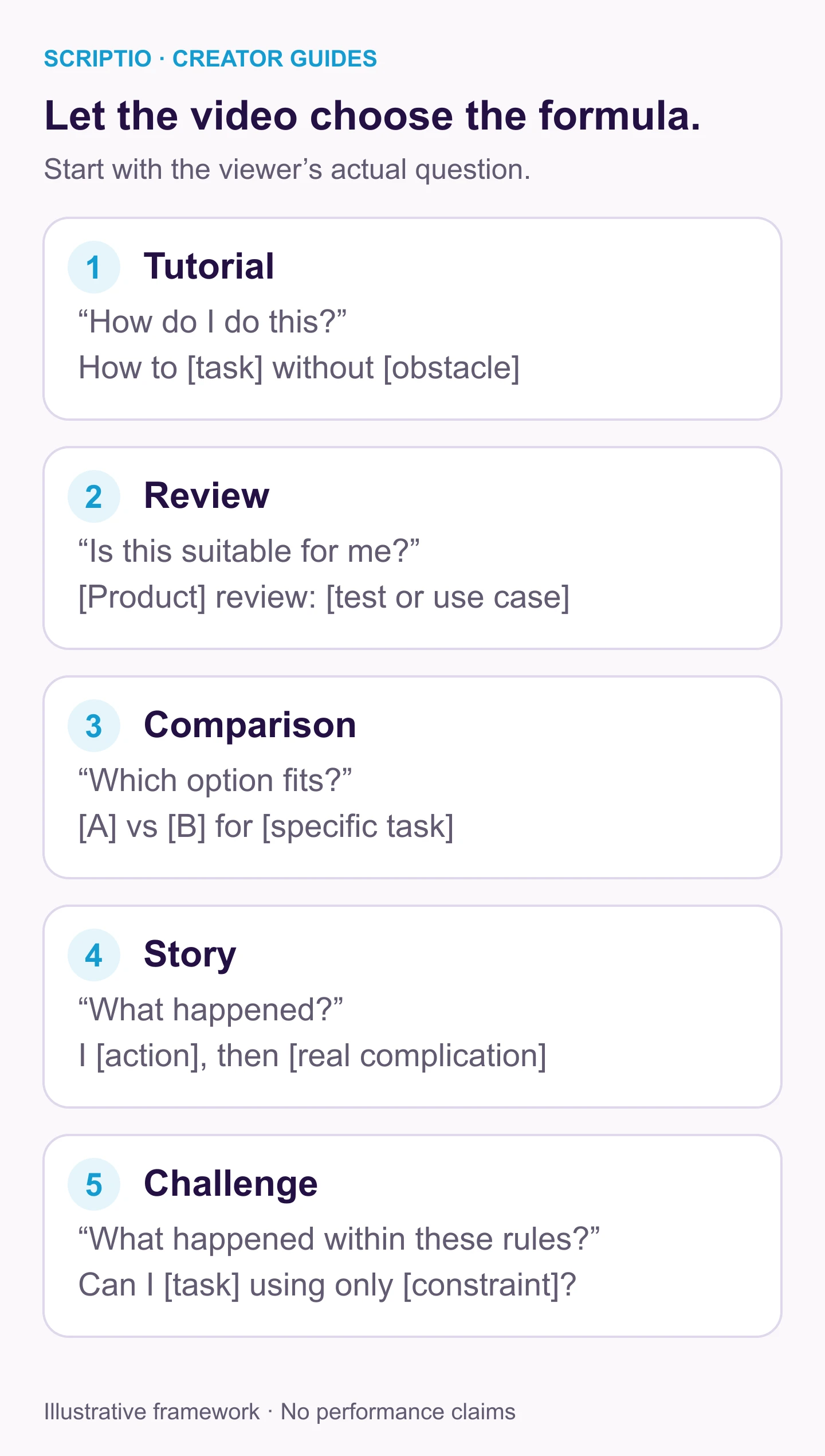
Choose the format your edit actually delivers, then fill the structure with real details. The same topic can support different formulas, but each title needs the footage and opening to fulfill its particular promise.
Worked transformation: one outline into three formats
Suppose your outline contains a noisy voiceover, three room adjustments and a recording after each adjustment. The same footage can support the three angles below, but each requires the edit to emphasize a different viewer payoff.
- Tutorial angle: “Noisy Voiceover? Try These 3 Room Adjustments.”
- Comparison angle: “Empty Room vs Soft Furnishings: Voiceover Sound Test.”
- Story angle: “I Tried Recording in My Empty Room. Here Is What I Changed.”
These are different promises. Select the one your edit actually fulfills. A tutorial needs reproducible steps; a comparison needs clear before-and-after conditions; a story needs a sequence of decisions. The image and opening must support whichever angle you select. A tutorial thumbnail might show the setup, while a comparison might show the two room conditions; the title–thumbnail paired examples demonstrate how to assign those roles without repeating the whole title in the image.
How to adapt a formula for Tamil or Tanglish
Preserve the task and evidence while adapting the language. A literal translation may sound awkward, especially for technical vocabulary your audience usually says in English.
- English: “Voice Recording Too Quiet? Check These 3 Settings.”
- Tanglish: “Voice Volume Kammiya? Indha 3 Settings Check Pannunga.”
- Tamil script: “குரல் பதிவு மெதுவாக இருக்கிறதா? இந்த 3 அமைப்புகளைப் பாருங்கள்.”
Choose the phrasing your target viewer can recognize and preview it in the upload interface; combining all three versions makes the same promise harder to read. For a first upload, the beginner title worksheet helps you identify what a stranger needs to know. For a short demonstration, the Shorts-specific approach helps you narrow the formula to one moment or answer.
Turn YouTube title templates into a finished title
- Finished video format: What does the edit mainly deliver?
- Viewer's question: What would make someone choose this video?
- Specific subject: Which product, task, place or situation is essential?
- Proof: Which clip or explanation supports the promise?
- Constraint: What genuinely distinguishes this video?
- Three angles: Write a direct, question and observation-based variant.
- Reject list: Remove unsupported numbers, superlatives and fake urgency.
- Packaging check: Compare the remaining title with the thumbnail and opening.
Save the rejected versions beside the reason you removed them, such as an unmeasured result or a comparison the footage does not contain. That record can reveal what evidence a future video would need, while keeping the current title honest about what this upload delivers.
Formulas to handle carefully
“Best” requires a defensible scope and comparison. “Guaranteed” usually exceeds what a creator can establish. “Nobody tells you” is difficult to verify. “In 30 seconds” needs to be true of the task or explanation you are promising. YouTube's title guidance emphasizes accuracy. Treat attractive wording as a draft until the evidence supports it.
If you use AI to brainstorm, provide the finished video's scope and tell it not to invent tests, results or durations. Suggested titles still need editorial review.
Frequently asked questions
How do I write the title of a YouTube video?
Summarize the specific promise, identify the video format and choose a formula that fits the evidence. Fill it with real details, remove filler and check it beside the thumbnail and opening. Draft different angles before selecting one.
Do I need numbers in every YouTube title?
No. A number is useful when the video genuinely contains that many items, steps or a measured constraint. A clear question, comparison or result can communicate the promise without a number.
Can you test titles on YouTube?
YouTube Studio has native A/B testing for eligible channels and videos. Its current documentation excludes Shorts. Check access in Studio; if you change a title manually, record the change and do not treat sequential results as a controlled A/B test.
Do you put YouTube titles in quotes?
You do not need quotation marks around the title you enter in YouTube Studio. Use punctuation when it clarifies the wording. If you are citing a video in an essay or bibliography, follow the citation style required for that document.
Draft three honest angles
Use the worksheet on your next finished outline to draft three angles, each supported by the same actual footage. You can try the Scriptio title tool for additional wording, then check every suggestion against the format, evidence and package. Keep the formula that communicates your video clearly and discard any version that invents a result or expands its scope.
Write your next script in 60 seconds.
Scriptio writes a full Tanglish script in your exact voice, built from your own channel.
Explore the Tamil AI script writer or the Tanglish script generator for a more detailed walkthrough.
Start Free at Scriptio.in