Quick Summary
- Give a stranger a reason to watch beyond the fact that this is your first upload.
- Name one task, story, demonstration or experience your video actually delivers.
- Use a channel introduction when introducing the channel is the viewer's real reason to watch.
- Draft a direct title and a more distinctive variant; check both against the thumbnail and opening.
- Publish a defensible title and learn from the video rather than waiting for a guaranteed winner.
Title your first YouTube video around what a stranger will learn, see or experience, rather than just announcing that it is your first upload. “My First Video” leaves the content unclear; “My First Solo Train Trip: What I Packed and Forgot” identifies a situation and a reason to watch. Keep “first” when that experience is part of the story, and name the task directly when the video is a tutorial.
You do not need years of analytics to make this decision. You need a specific video, an intended viewer and enough evidence to deliver its promise. The examples in this guide are illustrative, not tested growth claims.
Should your first YouTube video title introduce the channel?
Use a topic-led title when your first upload teaches, reviews or tells a story; use a channel-focused title when the video actually introduces what you will publish and whom it serves. Being the first upload does not make a video a channel introduction. A recipe tutorial should name the recipe, while a genuine introduction should explain the channel's focus and its value to a new viewer.
| Video you made | Weak starting title | More specific direction |
|---|---|---|
| A cooking demonstration | My First Cooking Video | Tomato Rice for Beginners: My One-Pot Method |
| A tech setup tutorial | Welcome to My Tech Channel | How I Set Up a Phone for Indoor Video Recording |
| A travel story | My First Vlog | My First Solo Train Trip: What I Packed and Forgot |
| A genuine channel introduction | Hello Friends! | Tamil Physics Explained with Everyday Examples |
| A documented creator experiment | New Beginning | I Recorded My First Tutorial Using a Phone |
The revised directions are useful only when they match the footage. “One-pot” needs a one-pot method. A travel title mentioning something forgotten needs that event in the story.
How to write a title for your first YouTube video
Step 1: write down who this video serves
Choose one viewer whose need you can picture, rather than trying to address everyone on your first upload. If you still need a repeatable subject area, the Tamil channel niche guide can help you connect your interests to an audience; then narrow this video to one of the specific needs below.
- A beginner who wants to cook one simple meal.
- A student confused by one physics concept.
- Someone recording their first voiceover at home.
- A viewer interested in a specific journey or experience.
“Everyone who likes Tamil videos” is too broad to guide this title. Language describes who can understand the video; the cooking task, physics question or recording problem explains why they would choose this particular upload. Name that need before deciding how to phrase it.
Step 2: choose one useful promise
Choose one outcome that your finished video can deliver and write it in plain language. Use the sentence below to separate an instructional promise from a story or experience, then check that the footage actually supplies the answer.
After watching, this viewer will be able to [do or understand something], or will have experienced [a specific story].
- Education: “Understand why a bulb behaves differently in two simple circuits.”
- Vlog: “Follow my first solo train journey and see how I handled one missed preparation.”
- Creator tutorial: “See how I positioned a phone and light for a small indoor recording space.”
If you have several unrelated outcomes, choose the one your footage answers most clearly and consider narrowing the edit around it. A title listing a recipe, a shopping trip and a channel announcement gives a stranger little guidance about the main reason to watch.
Step 3: identify what you can honestly show
Base your wording on something you can show: your setup, a clear explanation or a documented experience. The title strategy framework connects that proof to the viewer and promise, so you can make a useful first video without claiming broad expertise. Use “my setup” for your own arrangement, “beginner explanation” for an accessible lesson and “what I learned” for a personal experience.
Avoid “the best setup for every creator” if you have only tried one setup. Avoid “masterclass” for a short introductory lesson. A modest, specific claim is easier to deliver.
Step 4: compare three new-channel video title options
Draft a direct task, a specific constraint and a personal-experience angle using the same footage. These format-based title formulas offer different ways to express the value; choose between them by what the edit actually delivers, as the examples below show.
| Angle | Example for a first phone-filming tutorial |
|---|---|
| Direct task | How to Set Up a Phone for Indoor Video Recording |
| Specific constraint | My Small-Room Phone Filming Setup |
| Personal experience | I Filmed My First Tutorial in a Small Room |
The first is best suited to a video organized as instructions. The second should show the room and actual setup. The third promises an experience, so the edit needs to show the process. Do not choose the story angle merely because “I” sounds more personal. Pick the promise the finished video supports.
A completed worksheet for a new channel video title
Use the worksheet to connect your intended viewer, actual demonstration and title before adding dramatic wording. In this illustrative example, a Tamil creator shows how a phone, a window and a chair fit into a small-room recording setup; the completed fields keep the promise within that demonstration.
| Worksheet field | Completed answer |
|---|---|
| Intended viewer | A beginner recording a talking-head video at home |
| Main problem | They do not know where to place the phone and themselves |
| Actual demonstration | Phone position, window direction and a sample clip |
| Relevant constraint | A small room |
| Limits | No microphone comparison or universal lighting test |
| Direct title | Small-Room Phone Filming Setup for Beginners |
| Tanglish variant | Chinna Room-la Phone Video Shoot Setup |
| Thumbnail | The actual room with phone position visible |
| Opening | Show the finished sample, then reveal the room arrangement |
| Rejected title | The Best YouTube Studio Setup Under ₹500 |
| Reason for rejection | No verified cost breakdown or comparison with other setups |
The Tanglish variant means “Phone video shooting setup in a small room.” Its informal spelling can be adapted to how your viewers speak. This worksheet is a decision aid, not a scoring system. The rejected title is not rescued by being more dramatic.
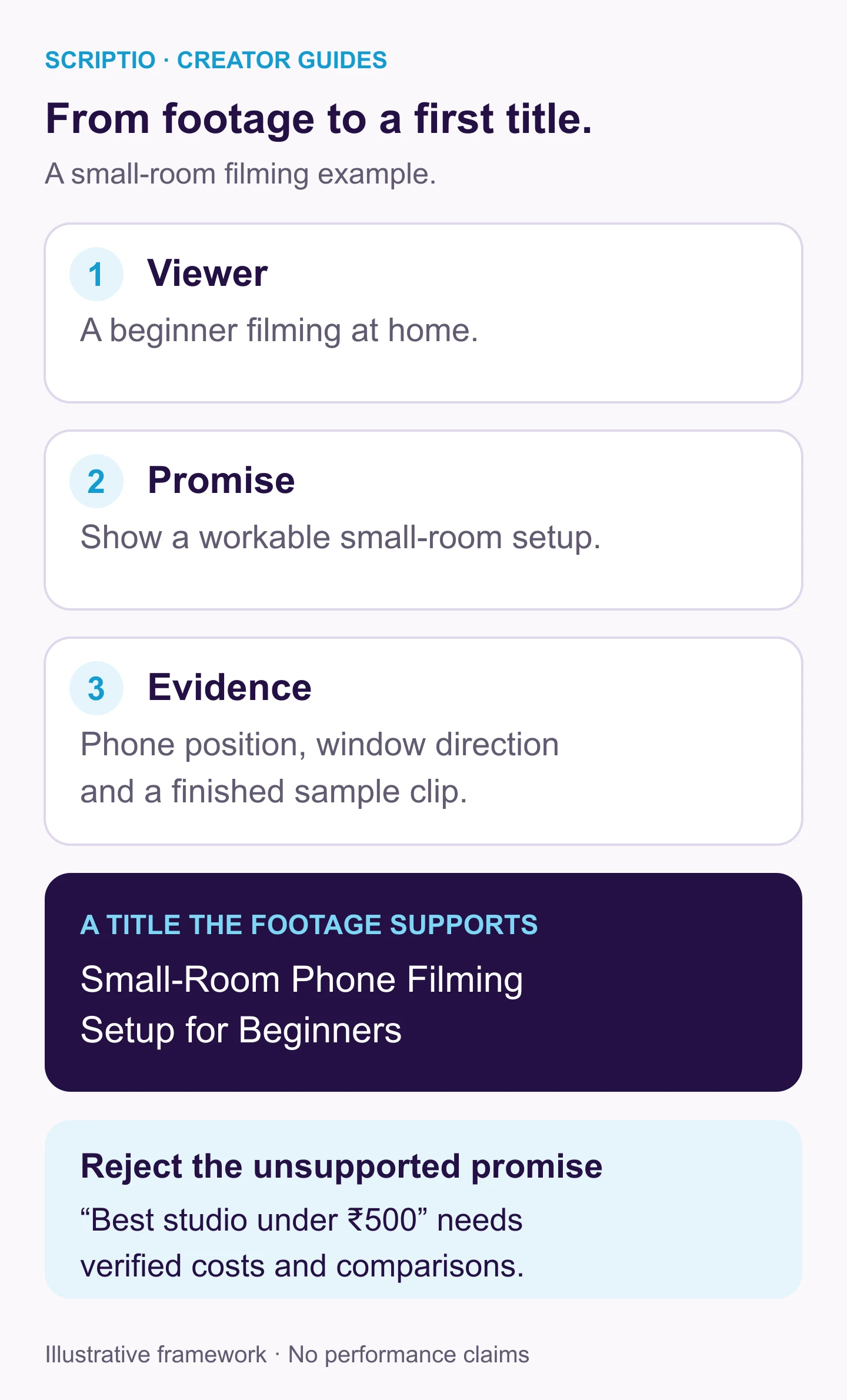
This title names what the creator can demonstrate without requiring previous channel familiarity. The rejected version would need a cost breakdown and comparison evidence that this example does not contain.
First YouTube video title ideas by niche
Begin with the useful subject or experience in your niche, then add the detail that distinguishes your video. These illustrative ideas show how a first upload can be specific without claiming established expertise; adapt every task, event and constraint to what you actually recorded.
- Cooking: “Tomato Rice for Beginners: My One-Pot Method.”
- Education: “Series vs Parallel Circuits Explained in Tamil.”
- Tech: “My First Phone Mic Test: Quiet Room vs Traffic.”
- Travel: “My First Solo Train Trip: What I Packed and Forgot.”
- Gaming: “My First Attempt at This Level Without Using a Hint.”
- Creator diary: “Recording My First Tutorial: The Mistake I Fixed.”
- Channel introduction: “A Tamil Cooking Channel for First-Time Home Cooks.”
Replace vague placeholders, such as “this level,” with the actual subject when that helps recognition. An unfamiliar gaming clip needs the game or challenge named. A channel introduction can still be specific without pretending it contains a full tutorial. Its promise is the focus of future videos; the introduction should clearly explain that focus.
Tamil, Tanglish or English for a first title?
Choose one main phrasing that the intended viewer can read easily. Technical terms may be more familiar in English even when the video is spoken in Tamil. For a beginner circuits explanation, all three options below preserve the same technical subject and Tamil-language context. Choose the version your intended viewer can recognize easily, then use the description for supporting details rather than stacking translations into the title.
- Tamil script: “தொடர் மற்றும் இணைச் சுற்றுகள்: எளிய தமிழ் விளக்கம்.”
- Tanglish: “Series vs Parallel Circuit: Tamil-la Simple Explanation.”
- English: “Series vs Parallel Circuits Explained in Tamil.”
Treat the language choice as a starting hypothesis, then check whether unfamiliar viewers understand the topic as intended. A first upload gives you limited channel-specific evidence, so clarity is a sound reason for choosing one version; a claim that it will outperform every other language option is not yet supported.
Check the title beside the image and opening
Ask a friend who has not seen your outline to describe the expected video after looking at the title and thumbnail. Compare their description with what you actually filmed. If they expect a microphone review but the video is a room tour, revise the package before publishing. The title and thumbnail examples show how to share essential context between the words and image. For a first Short, apply the Shorts title guidance as well, because its opening needs to establish the subject while the video may already be playing.
What should you do after publishing?
First, check that the title remains accurate and the opening gets to the promised content. Then review whatever audience data is available without overinterpreting a handful of views. YouTube lets you edit video details after uploading. Correcting an error is sensible; changing a title repeatedly because of tiny fluctuations gives you little reliable learning.
Record the title, thumbnail, upload date and any later revision. Note what you would explain more clearly in the next upload. Your first video can inform the second without proving a universal title rule. YouTube recommends succinct titles with important wording early. Use that as a final editing check before publishing.
Frequently asked questions
What is the best first YouTube video?
Choose a video you can finish that delivers one clear experience or answer to a specific viewer. A small tutorial, a focused review or a concrete story can be easier to package than a broad channel introduction. There is no first-video format that guarantees growth.
Should I call my first upload My First YouTube Video?
You can if the first-upload experience is the actual subject. Otherwise, name the useful task, story or result instead. A stranger usually needs more context than the fact that the upload is your first.
Should I put my channel name in the first video title?
Include it when it adds necessary context. For an unfamiliar channel, the topic or story is usually more useful at the beginning. You can put branding at the end or let the channel byline provide it.
Can I change my first video title after uploading?
Yes. YouTube Studio lets you edit video details after upload. Correct an inaccurate or unclear title when needed, record the change and avoid judging the effect from a tiny sample of views.
Finish your first title
Complete the beginner worksheet with your actual footage, then draft three versions and reject any unsupported promise. If you need additional wording options, use the Scriptio title tool and apply the same viewer, evidence and packaging checks to its suggestions. Publish the clearest match and record what you would improve for your next upload.
Write your next script in 60 seconds.
Scriptio writes a full Tanglish script in your exact voice, built from your own channel.
Explore the Tamil AI script writer or the Tanglish script generator for a more detailed walkthrough.
Start Free at Scriptio.in