Quick Summary
- Decide the video's promise before writing either the title or thumbnail text.
- Use the title for essential context and the thumbnail for a concrete visual, contrast or supporting detail.
- Judge the combined message; a short repeated word is fine when it helps recognition.
- Check the image at a small size and make the opening deliver the same promise.
- Test one element when diagnosing it, or test the whole package when comparing complete concepts.
Use the title to name the video's subject and essential promise, and use the thumbnail to show a result, contrast or situation that makes that promise easier to understand. Check both against the opening: the viewer should recognize the same video in the words, image and first scene.
For a Tamil creator, this may mean putting the product and test in the title while the image shows the comparison. For an education creator, the title might state the problem while the thumbnail shows the diagram used to explain it. The examples below are original, illustrative treatments. They are not real campaign results or tested performance claims.
YouTube title and thumbnail strategy: divide one promise
Begin with one sentence describing what the viewer receives, then divide that promise into information they need to read and information they can understand visually. Put essential subject or task context in the title; let the thumbnail show an object, result, contrast, location or moment from the story.
| Packaging element | Useful job | Common failure |
|---|---|---|
| Title | Identify subject, task or stakes | Vague words that require channel familiarity |
| Thumbnail | Make an important part visible | Too many competing objects or a false result |
| Opening | Establish the same situation and begin the payoff | An unrelated greeting or a different topic |
| Video body | Deliver the explanation, test or story | A claim the footage cannot support |
Choose those roles after identifying the viewer and the evidence your video contains. The YouTube title strategy framework connects those earlier decisions to the finished package, helping you avoid a striking image or headline that promises something the footage cannot deliver.
Annotated example 1: a Tamil tech review
For a microphone review, name the recording conditions in the title and make those conditions visible in the thumbnail. In this illustrative example, a creator tests the same wireless microphone indoors and beside a road, with original audio samples that let viewers hear the difference.
A title–thumbnail combination that leaves the test unclear
- Title: “Best Mic for YouTube!”
- Thumbnail: A microphone, several logos and “BEST MIC!”
The viewer cannot tell what was tested or whether the recommendation suits their recording environment. Naming the actual comparison and showing its conditions gives someone a clearer basis for deciding whether this review answers their question.
A YouTube packaging example that names the test
- Title: “Budget Wireless Mic Review: Indoor vs Roadside Audio.”
- Thumbnail: The actual microphone between two clearly labeled test locations.
- Optional text: “Traffic Noise?”
- Opening: Play a brief sample from each location before explaining the setup.
Why the parts belong there: The title describes the review and comparison. The image makes the recording conditions visible. The small text identifies a concrete concern rather than duplicating the title. Trade-off: If the exact microphone model matters to buyers, include its name in the title. “Budget” alone is not enough to distinguish one product from another. Do not write “noise cancelled” unless the test supports that wording.
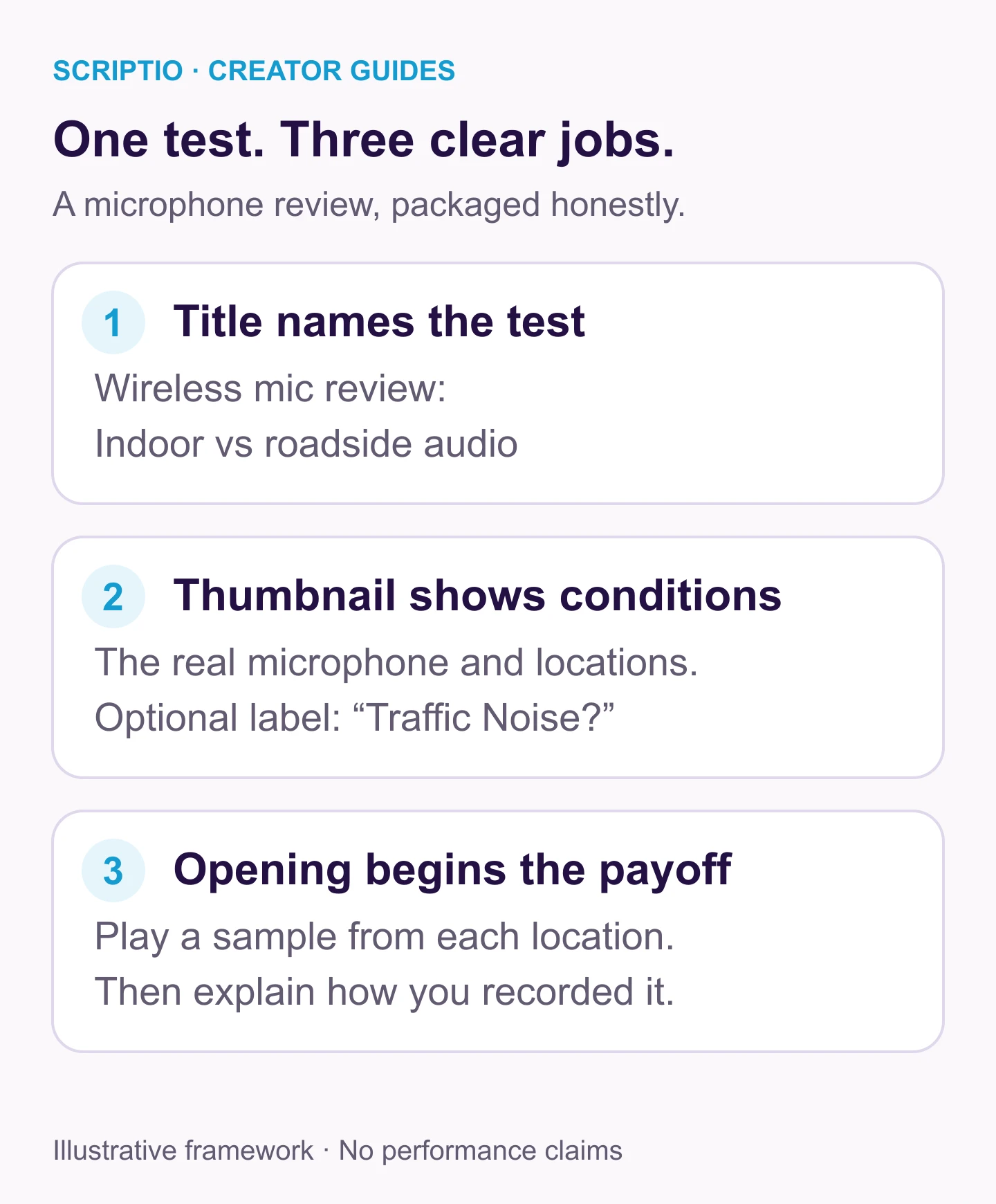
The words identify the comparison, the image makes its conditions visible and the opening lets viewers hear it. Keeping those jobs aligned avoids implying that the microphone eliminates road noise.
Annotated example 2: a cooking tutorial
For a cooking tutorial, let the title identify what the viewer will learn and the thumbnail show the result they are trying to achieve. This illustrative video demonstrates batter consistency and pan heat while making dosa, so the package can connect those two variables to the finished texture.
- Title: “Crispy Dosa at Home: Batter and Pan Heat Explained.”
- Thumbnail: A close-up of the finished dosa beside a small view of the batter.
- Optional Tamil text: “மொறுமொறுப்பாக?” meaning “Crispy?”
- Opening: Show the result, then explain the two variables the tutorial covers.
The title names the instructional value. The thumbnail shows the desired texture. It does not need to reproduce the recipe title word for word. If your video is about correcting one failed batch, narrow the title to that problem. Do not promise a complete dosa course when the footage covers one adjustment.
Annotated example 3: an education explainer
For an education explainer, name the concept in the title and use the thumbnail to make its central question visible. Here, a teacher explains series and parallel circuits with two diagrams, so showing the actual layouts gives the viewer more useful context than an unrelated reaction image.
- Title: “Series vs Parallel Circuits: A Tamil Beginner Explanation.”
- Thumbnail: The two actual circuit layouts with a single shared reference point.
- Optional text: “என்ன வித்தியாசம்?” meaning “What is the difference?”
- Opening: Show the diagrams and ask what changes when one bulb is removed.
Here, the contrast matters more than the teacher's facial expression. The title supplies the technical terms; the thumbnail gives the viewer a visual question. Avoid an unrelated exam score in the image. The lesson does not establish a score improvement.
Annotated example 4: a travel story
For a travel story, name the event in the title and show the actual situation in the thumbnail. This illustrative video follows a missed bus connection and the route taken afterward, giving viewers a concrete story question without needing to exaggerate the delay into an emergency.
- Title: “We Missed the Last Bus on Our Hill Trip.”
- Thumbnail: A genuine frame of the bus stand with the creator and luggage.
- Optional text: “Next Stop?”
- Opening: Establish the missed connection and available options.
The title supplies the event; the thumbnail shows the situation. There is still a reason to watch: what happened next. Do not imply danger or abandonment when the actual footage shows a routine delay. If the video is mainly a route tutorial, its title should name the route instead. Format-specific title formulas help distinguish a story from a guide.
When should a title and thumbnail repeat information?
A product name, recognizable place or central number may help the title and image feel connected. Duplication becomes less useful when every word repeats and the image supplies no new information. Ask whether the image still contributes if you remove its text. For a phone comparison, two visible phones and sample photos may communicate more than a sentence; for an abstract explanation, a short label may be necessary. Keep the repeated words that help recognition and remove those that merely occupy space.
A practical worksheet for your next upload
Complete the worksheet before opening a design tool so the message determines the layout. If this is your first upload, the beginner title worksheet helps you define a specific viewer and promise before deciding what the image should show.
| Field | Your answer |
|---|---|
| Intended viewer | Who needs this video? |
| One promise | What will they understand, do or experience? |
| Evidence | What footage or explanation supports it? |
| Essential title context | Which topic, object or situation must be named? |
| Thumbnail contribution | What can the viewer see that the title cannot show? |
| Opening payoff | How will the first scene confirm the promise? |
| Risk of misunderstanding | What might someone reasonably assume that is not true? |
Worked answer: For the microphone review, the risk is viewers assuming the microphone eliminates road noise. The package should instead promise an audio comparison so viewers can hear its limitations.
Check readability and expectation together
Check whether the pair communicates the actual video at a small size, then compare the expectation it creates with the opening and conclusion. YouTube advises accurate titles and readable, uncomplicated thumbnails; the review below turns that guidance into a practical comprehension check before publishing.
- View the pair at roughly the size it will occupy on a phone.
- Read the title without the image. Identify the topic.
- View the image without the title. Identify its focal point.
- Combine them and describe the promised video in one sentence.
- Compare that sentence with the opening and conclusion.
- Remove any element that implies evidence you do not have.
This preview checks whether a stranger understands the package; it cannot predict views or establish a ranking outcome. For a Short, assess whether the opening communicates the subject while the video is already playing. The Shorts title guide explains how to make the title useful in search without expecting it to carry the entire feed experience.
How to test the pair without confusing the result
If you are testing thumbnail readability, keep the title unchanged. When you compare two complete story angles, changing both is reasonable because the result belongs to the entire package. YouTube's native A/B test compares up to three options and evaluates watch time. It requires an eligible channel and video; the current documentation excludes Shorts. Check availability in Studio before planning around it.
For a manual revision, save the old title and thumbnail, timestamp the change and record what you expect it to improve. Traffic source and audience can change over time, so sequential results are not a clean controlled experiment.
Common mistakes to remove
- Too many promises: A title promises a review, the thumbnail promises a tutorial and the opening presents a challenge.
- Unrecognizable context: “This Changed Everything” beside an unfamiliar face gives strangers little to work with.
- Invented proof: Fake receipts, unsupported graphs or an edited before-and-after exaggerate the video's evidence.
- Tiny qualifications: A small caveat does not undo a dominant misleading claim.
- Judging only clicks: More clicks are not enough if the package attracts the wrong viewer.
Frequently asked questions
Which matters more: the YouTube title or thumbnail?
They communicate different parts of the same choice. A clear image cannot explain every detail, and a useful title cannot compensate for an unreadable image. Diagnose the pair on the surface where viewers encounter it rather than assigning a universal winner.
Why do YouTubers keep changing their thumbnails and titles?
Creators may revise unclear packaging or test a different angle. A change is an experiment, not proof the new version is better. Record the hypothesis, compare relevant audience data and keep the video promise accurate.
Does changing the thumbnail affect views?
It can change how viewers respond when they encounter the video. That does not guarantee more views: topic demand, audience mix and the video itself also matter. A before-and-after comparison alone does not isolate the thumbnail's effect.
Should the thumbnail repeat the title?
A short shared term can help recognition, such as the product name. Repeating the whole sentence usually leaves less room for a useful visual or supporting detail. Keep necessary context in the title and let the thumbnail add something the viewer can see.
Finish one coordinated package
Write one promise for your next video, then complete the worksheet with the evidence and visual material you already have. If you need wording options, use the Scriptio title tool and review each suggestion beside the image and opening. Choose the pair that makes the actual video easiest to understand, then remove any detail that creates a different expectation.
Write your next script in 60 seconds.
Scriptio writes a full Tanglish script in your exact voice, built from your own channel.
Explore the Tamil AI script writer or the Tanglish script generator for a more detailed walkthrough.
Start Free at Scriptio.in